
 admin
admin
What are the best PUBG settings? The innovator of the battle royale genre has changed quite a lot over the last seven years meaning the settings you used at launch may not be suitable anymore.
Given how long PUBG has been around, you won’t need the best graphics card to run it, but getting great performance and high fps is crucial to winning those tense 1v1 firefights. We’ve put together a handy guide to ensure you’re using the best settings possible for your gaming PC.
Best PUBG graphics settings
- Render scale: 100
- FPP Field of view: 103
- Overall graphics quality: Custom
- Anti-aliasing: Ultra
- Post-processing: High
- Shadows: Low
- Textures: Ultra
- View distance: High
- Sharpen: Disable
- V-Sync: Disabled
- Motion blur: Disable
- DirectX version: DirectX 11 Enhanced
Reducing the render scale lowers the clarity of your game, so we recommend sticking to the default value of 100, which means the game will be rendered in accordance with your selected resolution. For your FFP Field of View value, this should be as high as it can go in order to see as much as possible on the screen. Lowering this value can improve your performance, but only slightly.
As for anti-aliasing, this is perhaps the most contested PUBG graphics setting. We recommend setting this to ultra but beware of any fps drops between settings levels and make a judgment call if the offset isn’t worth it. If you’re struggling to get solid 60fps performance, you can gradually drop the settings on offer until you’re happy with your performance.
In order to see everything clearly in-game, bump textures up to ultra. Keep your view distance on high to maximize your ability to see enemies from afar, but this can be turned down to medium if performance becomes an issue. You’re going to want to disable the sharpen option as it clashes with anti-aliasing and these two settings don’t play nicely with each other. Keep V-Sync disabled unless you’re experiencing bad screen tearing, though be warned this can impact your performance. Always turn motion blur off, this setting might look nice but it comes with a performance hit. Finally, use DirectX 11 Enhanced as DX12 is still said to be unstable.
Best PUBG controls and gameplay settings
- Mouse sensitivity: Default
- Inventory character render: Off
- Crosshair color: White
- Default firing mode: Full Auto
- Auto-equip and replace attachments: Enable
- Additional action queuing: Enable
- Replay and death cam: Enable
As with most competitive games, the general guidance from high-level players is to drop your mouse sensitivity lower than the default if you find it hard to control recoil. This is completely down to personal preference, so don’t let us deter you if you use high mouse sensitivity settings. Rendering your character in the inventory doesn’t cause much lag, but we’ve kept this setting disabled to avoid any unnecessary frame rate drops.
Another personal preference option, pick any color crosshair you find to be the most visible. The default firing mode is a really important option, you’re going to want to set it to full auto. This is usually the best mode when engaging an enemy immediately after picking up the weapon. Likewise, enable auto-equip and replace attachments to save you some time on the battlefield. We recommend enabling additional action queuing, this allows you to register a new action before the current one ends. Finally, it never hurts to keep the replay and death camera on to learn from your mistakes.
Best PUBG audio settings
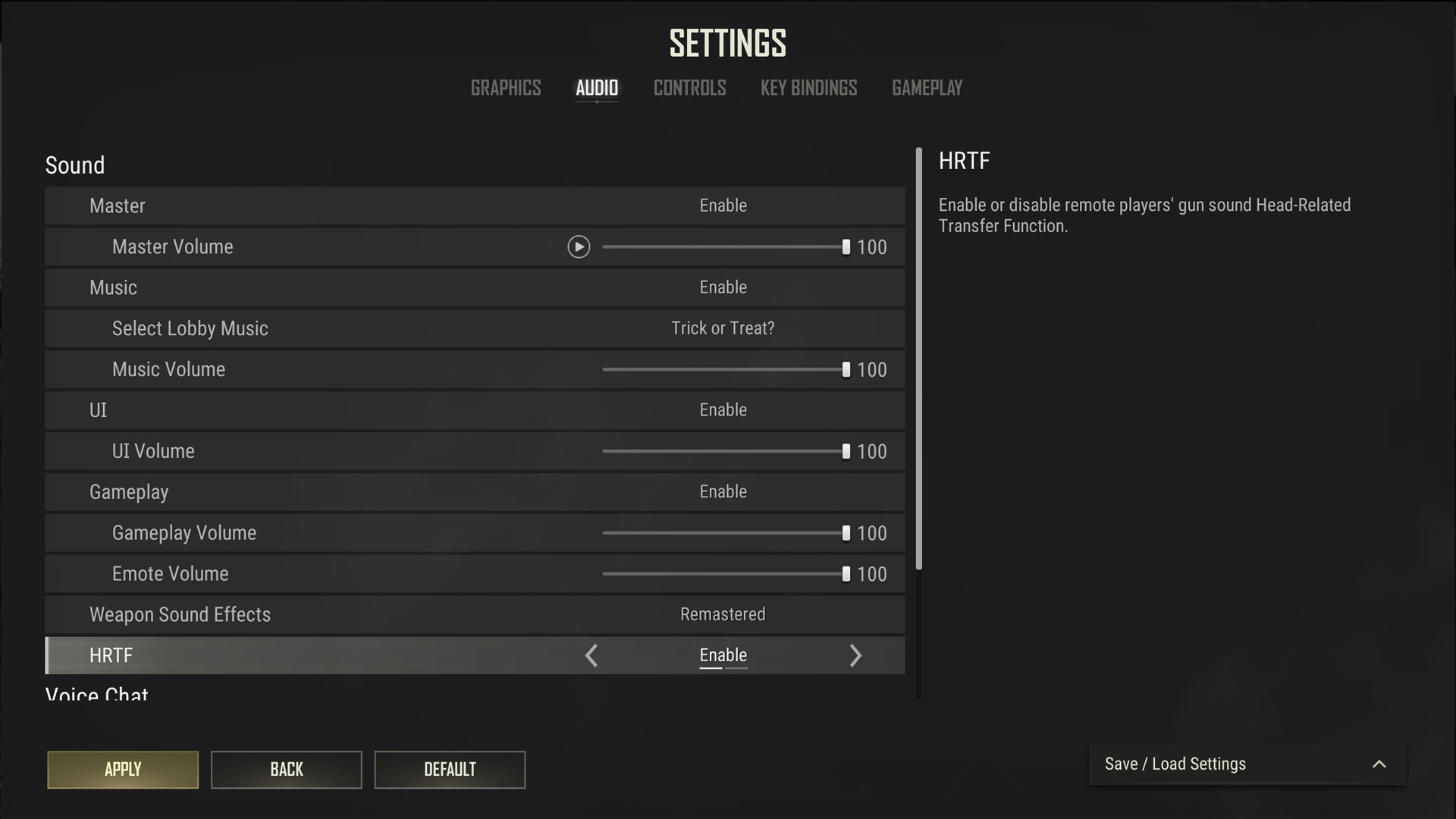
- Lobby music: Disabled
- Weapon sound effects: Legacy
- HRTF (Head-Related Transfer Function): Enabled
It’s up to you whether you want to hear the PUBG lobby music, at least you can choose your favorite song while waiting in the lobby. For the weapon sound effects, this comes down to preference. If you’ve been playing PUBG for a long time, you might want to stick with the legacy sound. Definitely enable HRTF as this audio setting makes tracking enemies significantly easier.
How we test PUBG
At PCGamesN, we use dedicated gaming rigs to test the best settings for performance and gameplay in the latest releases. The test rig used for PUBG includes the following components; Intel Core i7 11700F, Nvidia GeForce RTX 4070 12GB, 32GB of DDR4 3200MHz RAM, MSI B560 motherboard. We also test using Widows 11 64-bit.
We always run our testing first at 1,920 x 1,080 to identify the best settings, then again at 2,560 x 1,440 using the same setup to gauge the difference in performance. We use CapFrameX to capture frame data and compare testing sessions.
How to monitor performance in PUBG
If you want to keep an eye on performance in PUBG, we have an easy method that works whether you’re using an Nvidia or AMD graphics card.
For Nvidia cards, ensure you have GeForce Experience or the Nvidia App installed and the in-game overlay enabled. Then hit Alt + R in-game to bring up your performance monitor. With AMD cards, you can enable performance monitoring via the Radeon overlay using the shortcut Ctrl + Shift + O.
Alternatively, you can download free software such as CapFrameX or Nvidia FrameView, to get a cleaner, more simplified benchmarking tool that works with any graphics card.
If you need to upgrade your hardware to start playing PUBG, follow our handy guide on how to build a gaming PC, which takes you through the process step by step from start to finish.
And that concludes our best PUBG settings. If you’re looking to improve your PUBG knowledge, we highly recommend checking out our PUBG map guide to get an overview of each level. You can take this even further by reading our PUBG secret room locations guide to find hidden loot on Taego.
